Debrief
v3.0.0
Version 3.0 lets you chat with your meetings, teaches MeetingDebrief to tell who's talking, and gives your recordings a serious audio-quality glow-up. Ask questions and get answers, know who said what, and enjoy cleaner sound in and sharper transcripts. It's also a lot quicker.
Highlights
Chat with your transcript
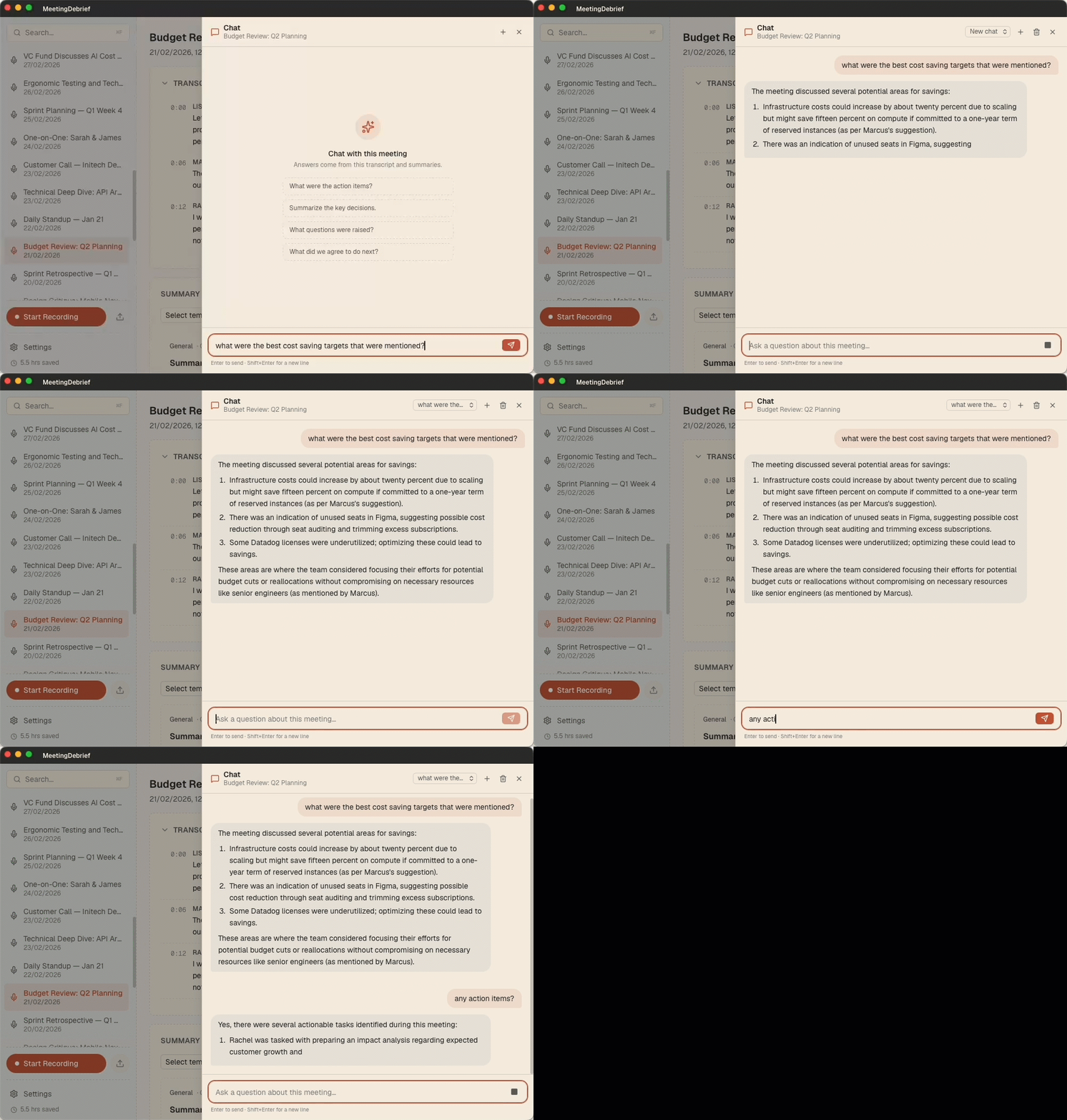
Long meeting? Just ask. The new chat panel lets you ask questions about any recording; "What were the action items?", "What did we decide about the budget?", "What did Sarah commit to?", and get a streamed answer drawn from the whole transcript, not just a keyword match. Answers cite the moments they come from: click a timestamp and MeetingDebrief jumps the audio and transcript right to that point. For long meetings, it automatically pulls in the most relevant parts so even hours-long recordings stay answerable. Open it from any meeting with Chat with this meeting (or ⌘L / Ctrl+L), and as with everything in MeetingDebrief, your conversation never leaves your computer.
Know who said what
Transcripts now label each segment by speaker. When you record both your microphone and system audio, MeetingDebrief separates Me from Other automatically, so a back-and-forth reads like a real conversation instead of one long block of text. Speaker labels show up in the history view and are included when you copy a transcript. Naming speakers is on the roadmap, but for now, "Other" will have to do.
Echo cancellation
No more hearing yourself twice. When the other side's audio leaks back into your microphone, MeetingDebrief now cancels that echo — during recording when possible, with an automatic offline cleanup pass as a fallback. The result is a clean mic channel and far fewer doubled-up words in your transcript.
Cleaner recordings, better transcripts
We added real-time noise suppression, a high-pass filter, and automatic gain control to the recording pipeline. Background hum, keyboard clatter, and uneven volume get smoothed out before transcription ever runs — which means more accurate text, especially in noisy rooms and quiet talkers alike.
No more phantom subtitles (or Hallucinations during silence)
Local speech models sometimes invent text during silence — stray "thank you for watching", "🎵 music 🎵 ", or the same phrase repeated on a loop. MeetingDebrief now recognizes and removes these known artifacts, so your transcript reflects what was actually said.
Bring your meetings to your AI tools
MeetingDebrief now ships a built-in MCP server, giving AI assistants like Claude Desktop, Claude Code, and Cursor read-only access to your transcripts and summaries. Ask your favorite agent to search across meetings, pull up a transcript, or summarize what you committed to last week — without copy-pasting anything. Settings → MCP gives you a ready-to-paste config with a Copy button to wire up a client in seconds. It runs on demand as a local sidecar, opens no network ports, and — like everything in MeetingDebrief — nothing leaves your machine.
Other improvements & fixes
- Rebuilt audio resampling to run a single high-quality pass at the device's native rate for cleaner, more faithful sound.
- Fixed a resampling issue that could truncate very short audio clips.
- Improved macOS system-audio (loopback) capture reliability, with better diagnostics when a device misbehaves.
- Added a full-text search endpoint to the local API, powering cross-meeting search for connected AI agents.