Debrief
Release notes
v4.0.0
Version 4.0 gives MeetingDebrief a second transcription engine, teaches it the words it keeps getting wrong, and gets out of your way while it works. Parakeet arrives as a preview alongside Whisper, Vocabulary replaces the old word-replacement list with something that actually learns, and long transcriptions and summaries now run in the background so the app stays usable while they do.
Highlights
A second transcription engine: Parakeet (Preview)
MeetingDebrief is no longer Whisper-only. Parakeet TDT v3 (Multilingual) — NVIDIA's 0.6B speech model — is now available as a second engine, covering 25 languages including English and Dutch, with punctuation, capitalization and word timestamps built in.
Download it from Settings → Models (~714 MB) and pick Use. It runs entirely on your machine, like everything else here: no cloud inference, no Python environment, no ONNX install, no NVIDIA GPU required. On Apple silicon it runs on the GPU via Metal. Live captions work too — Parakeet listens in buffered windows and revises what it heard as more audio arrives, so captions firm up as you talk.
Your existing setup is untouched. Whisper stays selected if that's what you're using, each recording remembers the model that produced it, and the final transcript flows into the same corrections, summaries, chat, search, export and Markdown mirror as before.
This is a preview, please let me know how it behaves.
Vocabulary: teach it your jargon once
Names, acronyms, product names and internal shorthand are exactly what local speech models mangle. The old Word Replacements list handled that after the fact. Vocabulary replaces it with something that works at three points at once: it primes Whisper before it listens, corrects the transcript as it's saved, and explains your terms to the model that writes summaries and answers chat questions — so "WHOOP" stops becoming "hoop", and the summary knows what it is.
Terms carry a meaning and any number of aliases, and the list grows as you work:
- From your edits — fix a word in a transcript and MeetingDebrief offers to remember it: "Always fix 'Kubernetis' → 'Kubernetes'?"
- From your transcripts — select a term in any transcript and add it straight from the floating chip.
- From the AI — Suggest terms reads a meeting and proposes the product names, acronyms and jargon it found.
Your existing word replacements move over automatically. Regex, substring and case-sensitive rules stay exactly as they were, now under Advanced corrections inside the Vocabulary panel.
Transcription and summarization run in the background
Starting a transcription or a summary no longer blocks the app. Both now run as background jobs with live progress and a Cancel button, so you can browse other meetings, take notes, or start a recording while a long transcript is still processing — and the progress follows you around the app rather than living in one view. Sessions can no longer get stuck in "summarizing" when something fails, and on Windows the worker processes no longer flash up console windows.
Force a language when detection gets it wrong
Whisper occasionally misidentifies similar languages — Finnish read as Swedish will derail an entire transcript. Re-transcribe is now a split button: the main half re-runs with auto-detection, and the attached caret opens a searchable language picker to force the right one. The detected language shows in the session header, and the sidebar gives each meeting a distinct icon for awaiting transcription, in progress, error, and done.
When the selected model won't honour a forced language, the picker now says so instead of silently ignoring the choice — Parakeet always auto-detects, and an English-only Whisper build is pinned to English.
Summaries tell you when they're out of date
Transcripts now carry a revision number, and every summary records the version it was written from. Edit a transcript or re-transcribe a meeting and its existing summaries are flagged "Transcript changed — regenerate summary" rather than quietly describing a transcript that no longer exists.
Other improvements & fixes
- NEW: The floating recorder gets an Open main window button, so you can jump back to the app without going through the tray menu.
- NEW: The local API can be exposed on your whole network instead of just this machine — off by default, in Settings → API. Useful for integrations running on another device; leave it off if you don't need it.
- NEW: Vocabulary is reachable from the local REST API, so connected tools can read and add terms.
- Vocabulary terms can be imported and exported as plain text, so a shared team glossary is a copy-paste away.
- FIXED: Summaries could hang before they even started on Windows machines that silently drop loopback connections — the first readiness check to the summarization engine waited forever, and the stuck job kept the "busy" flag set, so no further summary could run even after cancelling. Those checks are now bounded and cancellable.
- FIXED: License activation against an unreachable server hung indefinitely instead of reporting a network error. License requests now time out and fail fast.
- FIXED: Opening MeetingDebrief could start a second copy when the previous instance's handshake file was gone (macOS) or the running copy was elevated (Windows). Two copies shared one database and fought over the API port, which broke the MuteDeck integration. A lock file in the app data folder now settles it, and restarting after an update is no longer mistaken for a duplicate launch.
- FIXED: Live captions survive a window reload and recover if the transcription worker crashes, instead of going silent for the rest of the recording.
- FIXED: Cancelling a transcription no longer publishes a partial transcript or leaves the session in a stale state.
v3.3.1
Version 3.3 focuses on the quality and reliability of your summaries: they now take in the whole meeting at once, always finish what they were writing, and make better use of your GPU. Transcription in languages other than English is faster, too.
Highlights
-
IMPROVED: Summaries now see the whole meeting — MeetingDebrief sizes the model's working memory to your transcript, so very long meetings are summarized in a single pass whenever your hardware allows, instead of in stitched-together parts. Chatting with a meeting benefits from the same change: answers are grounded in the full conversation, even for hours-long recordings.
-
IMPROVED: Long summaries finish cleanly — the model now gets all the writing room your hardware has available, and automatically picks up where it left off if it reaches its output limit. In the rare case where space truly runs out, the summary says so instead of stopping short.
-
IMPROVED: Better GPU acceleration on Windows (NVIDIA) — summarization is now more dependable about running on the GPU, and the model engine checks and repairs its own installation on update — no reinstall or manual download needed. Each meeting also shows a small GPU/CPU icon, so you can see at a glance which one produced its summary.
-
IMPROVED: Sturdier summarization — if the summarization engine runs into trouble mid-summary (typically on machines with little free memory), MeetingDebrief restarts it and retries automatically. On Macs, the model's memory use is now matched to your machine to avoid getting into that situation at all.
-
IMPROVED: Faster transcription in other languages — the spoken language is detected once per recording rather than repeatedly, and tricky audio passages are retried less aggressively.
Other improvements & fixes
- Opening MeetingDebrief while it's already running brings the existing window to the front instead of starting the app twice.
- The local API binds exactly the port you configure — and lets you know if it's taken — so integrations that depend on a fixed port (like MuteDeck) keep working.
- Deactivating your license now asks for confirmation first.
- Summary edits in progress and search highlights no longer carry over when switching to another meeting.
v3.2.0
Version 3.2 makes your meetings yours to edit and organize. Fix a stray word in a summary or transcript, jot notes as you go, tag and find meetings in seconds, and teach MeetingDebrief the names and jargon it keeps getting wrong.
Highlights
Edit your summaries and transcripts
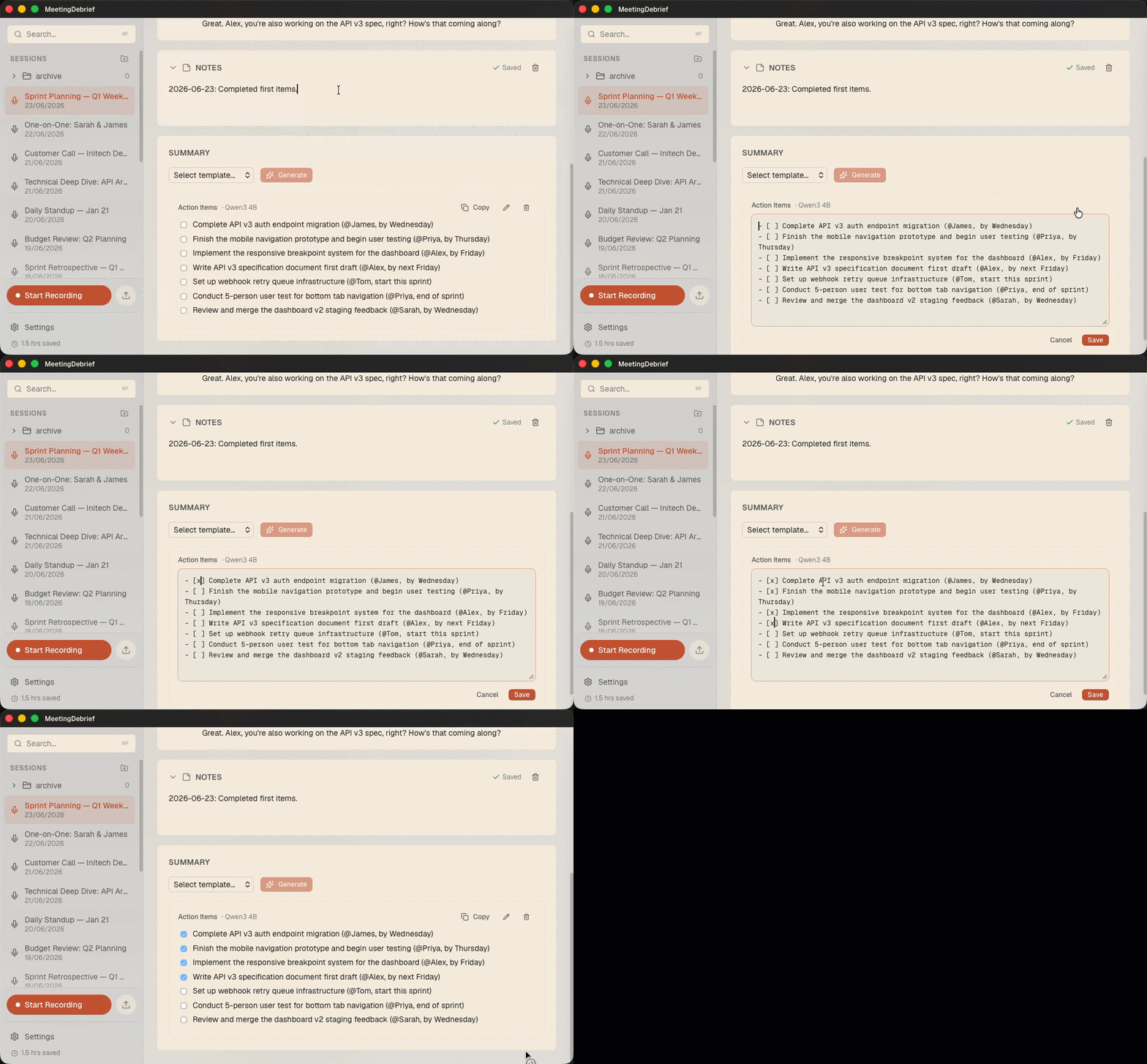
Auto-generated text isn't always perfect. Now you can fix it. Hover any summary or transcript line and edit it in place — correct a misheard word, tidy a heading, or rewrite a sentence. Your edits are saved, picked up by search, and written through to the on-disk Markdown mirror, so the corrected version is the one you'll find later and the one your other tools see.
Notes for every meeting
Add your own notes to any recording — agenda, follow-ups, the thing you didn't want to forget. Notes are fully searchable alongside your transcripts and summaries, and they're included as context when you chat with a meeting, so the assistant answers with what you wrote, not just what was said.
Tag and find your meetings
Give meetings free-form tags — standup, client-acme, 1on1 - anything you want. Tags show up in the session header, and you can search for them with tag: filters: tag:standup, or combine them with and/or to narrow things down. Search a tag on its own to pull up whole meetings, or pair it with a phrase to scope your search to just those meetings.

Teach it your vocabulary
Names, acronyms, product names, and jargon are exactly what local speech models tend to mangle. The new word-replacement dictionary lets you fix that once and for all: add the misspelling and the correction, and MeetingDebrief applies it automatically. No more correcting "Kubernetes" or your coworker's name in every single meeting.
Other improvements & fixes
- FIXED: Recordings could finish with no transcript when a stretch of silence followed speech, leaving the speech detector to hand the local model an empty buffer and fail the whole recording. This is fixed.
v3.1.0
- FIXED: A change in 3.0.0 made transcription noticeably faster, but it also introduced a regression: recordings could be cut off by a fixed time limit and finish with no transcript at all. Non-English speech takes the local model longer to process, so those recordings — along with any long meeting — were the most likely to hit the limit. This is now fixed.
- NEW: The sidebar is now a full folder tree, so you can create nested folders. Drag sessions and whole folders to rearrange them, and use the Move to menu to file a meeting away in a couple of clicks.
v3.0.0
Version 3.0 lets you chat with your meetings, teaches MeetingDebrief to tell who's talking, and gives your recordings a serious audio-quality glow-up. Ask questions and get answers, know who said what, and enjoy cleaner sound in and sharper transcripts. It's also a lot quicker.
Highlights
Chat with your transcript
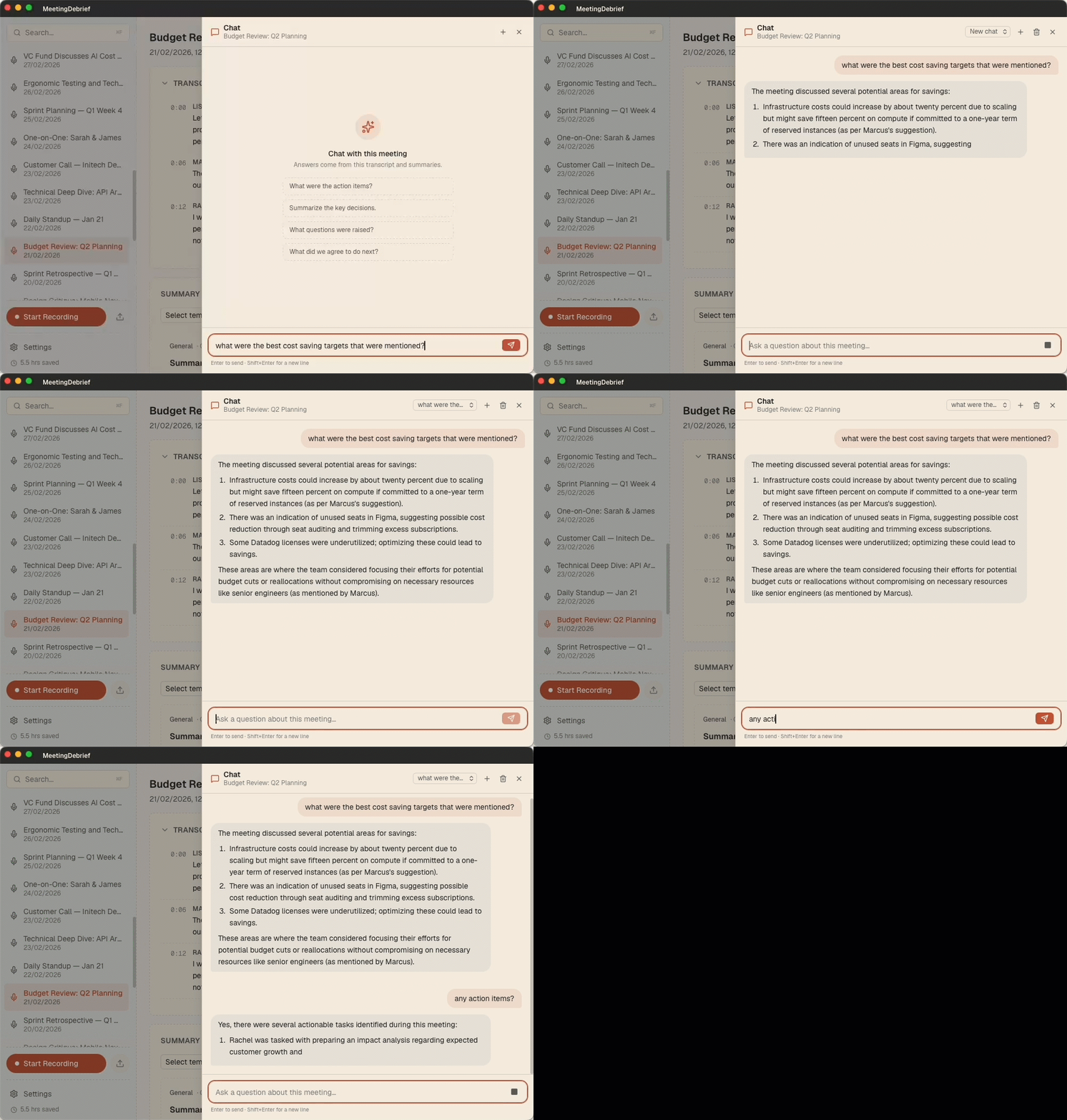
Long meeting? Just ask. The new chat panel lets you ask questions about any recording; "What were the action items?", "What did we decide about the budget?", "What did Sarah commit to?", and get a streamed answer drawn from the whole transcript, not just a keyword match. Answers cite the moments they come from: click a timestamp and MeetingDebrief jumps the audio and transcript right to that point. For long meetings, it automatically pulls in the most relevant parts so even hours-long recordings stay answerable. Open it from any meeting with Chat with this meeting (or ⌘L / Ctrl+L), and as with everything in MeetingDebrief, your conversation never leaves your computer.
Know who said what
Transcripts now label each segment by speaker. When you record both your microphone and system audio, MeetingDebrief separates Me from Other automatically, so a back-and-forth reads like a real conversation instead of one long block of text. Speaker labels show up in the history view and are included when you copy a transcript. Naming speakers is on the roadmap, but for now, "Other" will have to do.
Echo cancellation
No more hearing yourself twice. When the other side's audio leaks back into your microphone, MeetingDebrief now cancels that echo — during recording when possible, with an automatic offline cleanup pass as a fallback. The result is a clean mic channel and far fewer doubled-up words in your transcript.
Cleaner recordings, better transcripts
We added real-time noise suppression, a high-pass filter, and automatic gain control to the recording pipeline. Background hum, keyboard clatter, and uneven volume get smoothed out before transcription ever runs — which means more accurate text, especially in noisy rooms and quiet talkers alike.
No more phantom subtitles (or Hallucinations during silence)
Local speech models sometimes invent text during silence — stray "thank you for watching", "🎵 music 🎵 ", or the same phrase repeated on a loop. MeetingDebrief now recognizes and removes these known artifacts, so your transcript reflects what was actually said.
Bring your meetings to your AI tools
MeetingDebrief now ships a built-in MCP server, giving AI assistants like Claude Desktop, Claude Code, and Cursor read-only access to your transcripts and summaries. Ask your favorite agent to search across meetings, pull up a transcript, or summarize what you committed to last week — without copy-pasting anything. Settings → MCP gives you a ready-to-paste config with a Copy button to wire up a client in seconds. It runs on demand as a local sidecar, opens no network ports, and — like everything in MeetingDebrief — nothing leaves your machine.
Other improvements & fixes
- Rebuilt audio resampling to run a single high-quality pass at the device's native rate for cleaner, more faithful sound.
- Fixed a resampling issue that could truncate very short audio clips.
- Improved macOS system-audio (loopback) capture reliability, with better diagnostics when a device misbehaves.
- Added a full-text search endpoint to the local API, powering cross-meeting search for connected AI agents.
v2.0.0
This is a big one! Version 2.0 brings powerful new ways to find, export, and understand your meeting data — plus major improvements to audio capture and GPU performance on Windows.
Highlights
-
NEW: Audio File Import — Drop in an audio file (MP3, WAV, M4A, and more) and MeetingDebrief will convert, transcribe, and summarize it automatically. Great for processing recordings from other apps or devices.
-
NEW: Session Mirror — Automatically sync your transcripts and summaries to disk as Markdown files. Perfect for backing up your data or integrating with tools like Obsidian or Notion. Click the Open Sessions button in Settings -> About to see the folder where these files are stored.
-
NEW: Global Search — Instantly search across all your transcripts and summaries with
Ctrl+F(Cmd+Fon Mac). Full-text search so you can find that one thing someone said three weeks ago. -
NEW: Insights Dashboard — See how much time and money MeetingDebrief is saving you, based on your meeting history. A fun way to see the value of your summaries at a glance.
-
IMPROVED: Processing speed on Windows — Both transcription and summarization are now GPU-accelerated on Windows if you have an NVIDIA CUDA-compatible GPU. This can make processing up to 10x faster! The processing has also been optimized for less powerful machines, so you should see improvements even without a GPU.
More new features
- Summary language override — force summaries into a specific language instead of relying on auto-detection
- Audio file retention setting — control how long recorded audio files are kept to manage disk space
- Performance priority setting — choose between faster processing or lower system impact during transcription and summarization
- GPU-accelerated summarization on Windows — NVIDIA CUDA support now extends to the summarization model, not just transcription
- Improved audio capture on macOS - use CoreAudio for better performance and reliability when recording system audio.
Improvements & fixes
- Dates and times now follow your OS locale settings
- Model files are validated at startup with a notification if anything is missing
- Concurrent transcriptions and summarizations are now prevented to avoid conflicts
- Fixed transcript loss caused by non-UTF-8 characters in audio
- Clearer setting names and descriptions throughout
v1.6.0
- NEW: Real-time transcription — see your transcript appear live as you record
- NEW: Folder system for organizing recording sessions in the sidebar
- NEW: GPU-accelerated transcription on Windows to make it 10x faster
- NEW: New setting to control recording quality for better playback
- IMPROVED: Collapsible transcript area to save screen space
- IMPROVED: Automatically follows system default input device changes during recording
- FIX: Startup recovery for sessions stuck in a recording or summarizing state
- FIX: Transcription duration no longer inflated by system sleep time
v1.5.1
- NEW: Add audio player with transcript sync for session playback, if recording is available
- NEW: Multi-language support with automatic language detection for transcripts and summaries (no need to do anything, just speak your language and it should work)
- NEW: Add a microphone test to check if the mic is working and see volume levels
- IMPROVED for macOS only: Transcribing and summarizing now try to use the GPU if available, for faster processing
- IMPROVED: Add logging for troubleshooting issues with transcription, summarization, and audio playback (settings now has an "Open logs" button that opens the log file in the system file explorer)