How to Write a Sales Call Follow-Up Email from a Transcript
This guide shows how to turn a discovery call transcript into a sales call follow-up email with a sharper recap, accurate commitments, and one clear CTA.
Martijn Smit 10 min read
You finish a discovery call, open your inbox, and still have to write the part that matters: the sales call follow-up email. Done from memory, that email often gets less accurate with every sentence.
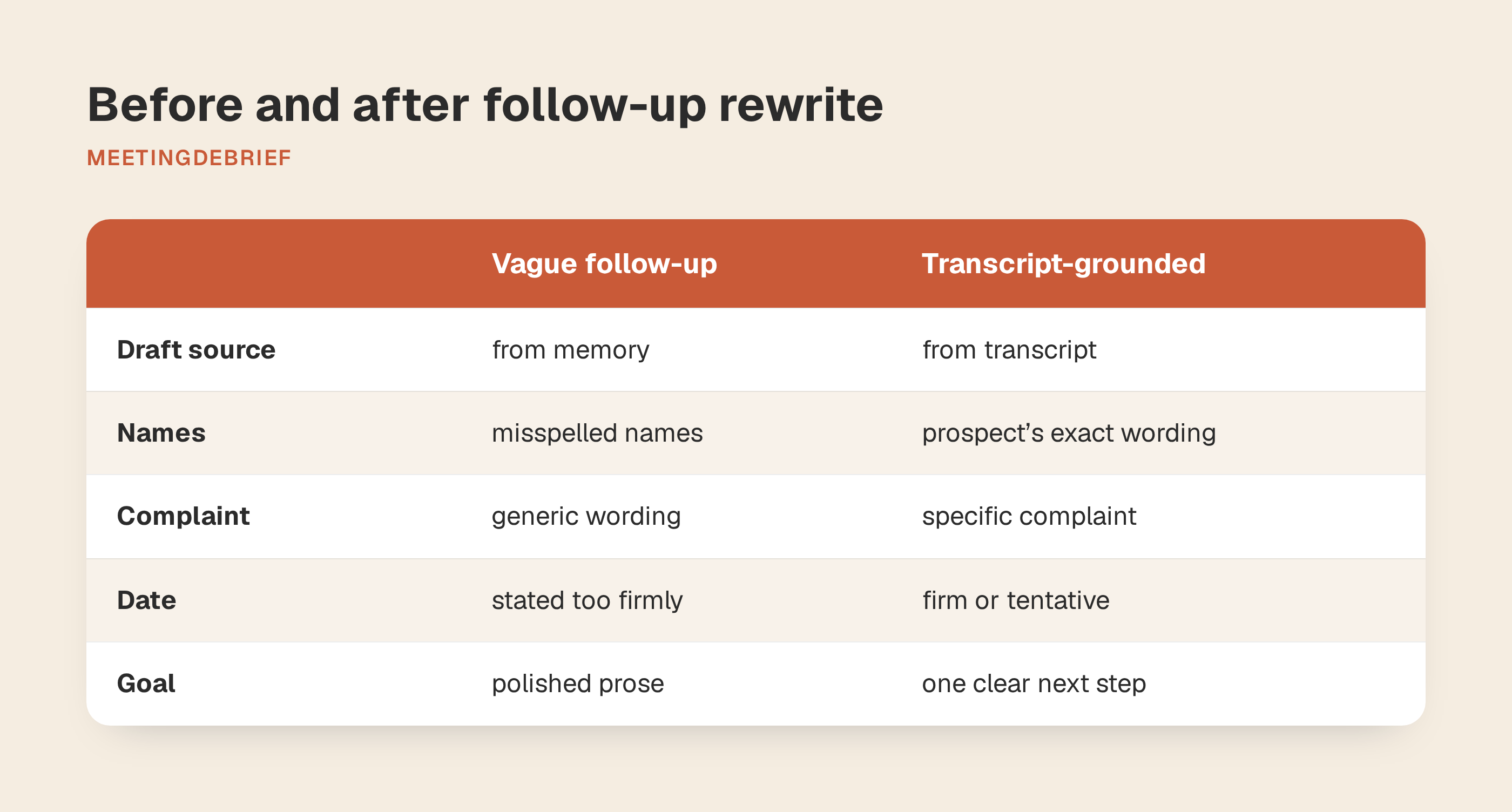
Names get misspelled. A specific complaint turns into generic wording. “We’ll aim for Friday” becomes a date stated too firmly. The note can still sound polished, but it stops reflecting what the prospect actually said. That is usually where trust slips.
The faster way to do it is to draft from the transcript, not recall, and trim the message to one clear next step. Check the call record while the conversation is still fresh, then send the email before other meetings blur the details.
Stop writing follow-ups from memory
A follow-up email is not just a courtesy. It becomes the written version of the conversation both sides will use later. That matters more when the call covered several problems, mentioned another stakeholder, or left a document, date, or introduction hanging.
Memory fails in predictable ways after a call. Details drop out, but they also change shape. Tentative language starts to sound final. Two people’s comments get merged into one vague summary. If you had meetings on both sides of that call, the odds of mixing them up go up.
A transcript removes the reconstruction step. You do not have to remember the prospect’s exact wording, sort the call in your head, and draft polished prose all at once. You already have the source material. Pull the lines that define the problem, confirm the commitments, and turn those into a short email.
Send it after that quick check, not hours later. You want enough distance to verify what was actually said, but not so much that the meeting starts to fade and “next week” stops meaning what it meant on the call.
The two-minute MeetingDebrief workflow after a discovery call
If you recorded the call in MeetingDebrief, start in the session, not in a blank email draft.
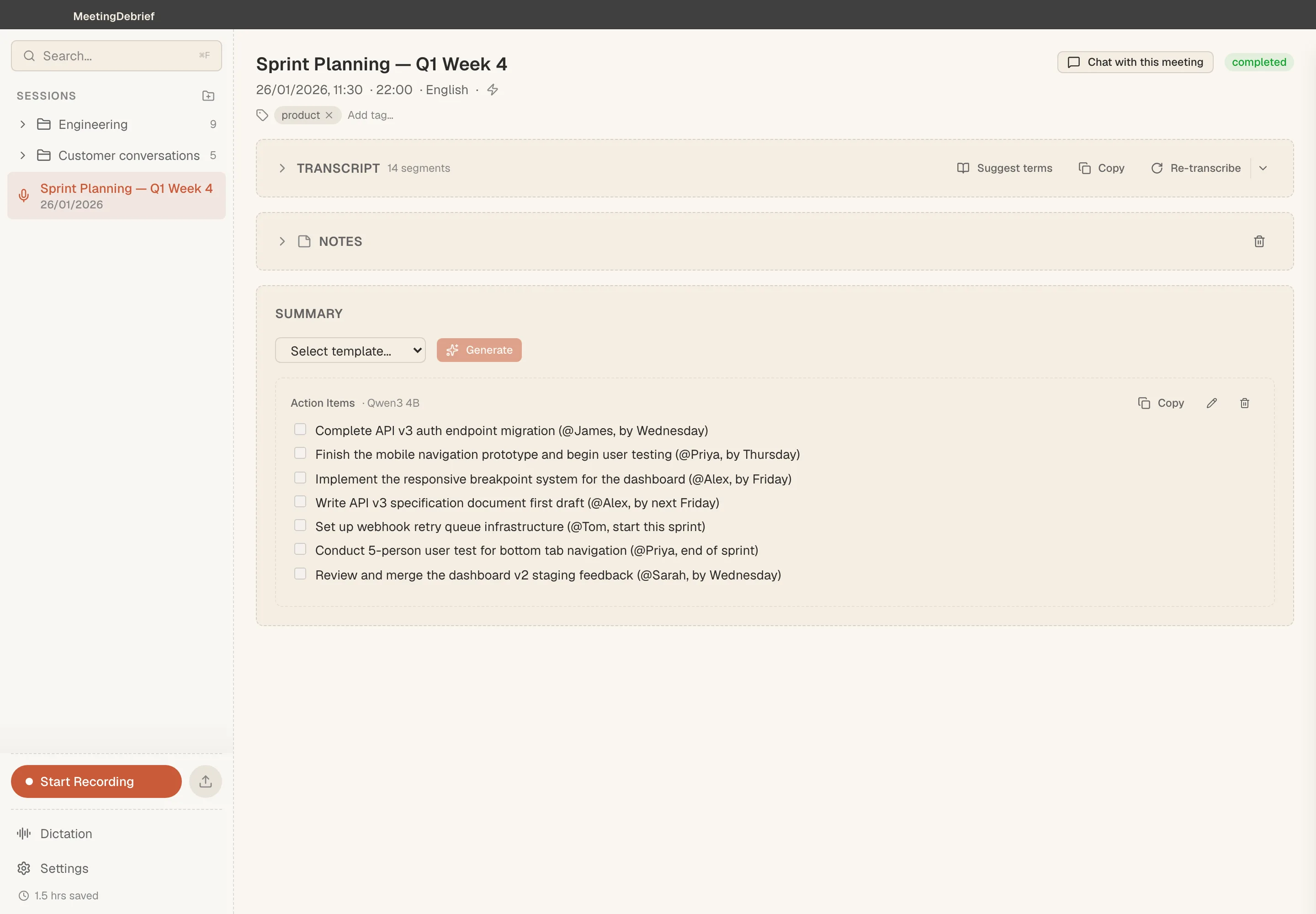 Use this order:
-
Open the transcribed session. Keep the transcript, summary, and your own notes in one place while you draft. That is faster than bouncing between the meeting app, a notebook, and your inbox.
-
Generate a Prospecting summary. In Session view → Summaries, choose Prospecting from Select template... and click Generate. The built-in Prospecting template is for sales or prospecting meetings, so it is a better starting point than a general recap. Use it to find the main problem, likely next step, and commitments worth repeating back. Do not paste it straight into the email.
-
Check your notes. In Session view → Notes, keep your own reminders beside the call record: send the pricing PDF, include a calendar link, confirm who should be copied, note that legal needs to review first. Notes save automatically, so they stay with the session instead of getting lost between meetings.
-
Copy the right source. If the summary is clean, use its Copy button and trim from there. If you need exact wording, use Session view → Transcript header → Copy. The transcript copies as lines like
[m:ss] Speaker: text, which makes verification easier. You can check the prospect’s phrasing before you restate a pain point, confirm who committed to an action, and see whether a date sounded firm or tentative.
Use the Prospecting summary to shape the email, then go back to the transcript only for the lines you need to verify. That way you are not reconstructing the whole call from scratch. You are checking the few details that usually matter in the follow-up: the pain point, the next action, and the date or owner tied to it.
Turn one call into five email blocks
A good sales call follow-up email is easier to write when you stop treating it like open-ended writing. Build it in five blocks, each with one job. That keeps the email short and makes the next step obvious.
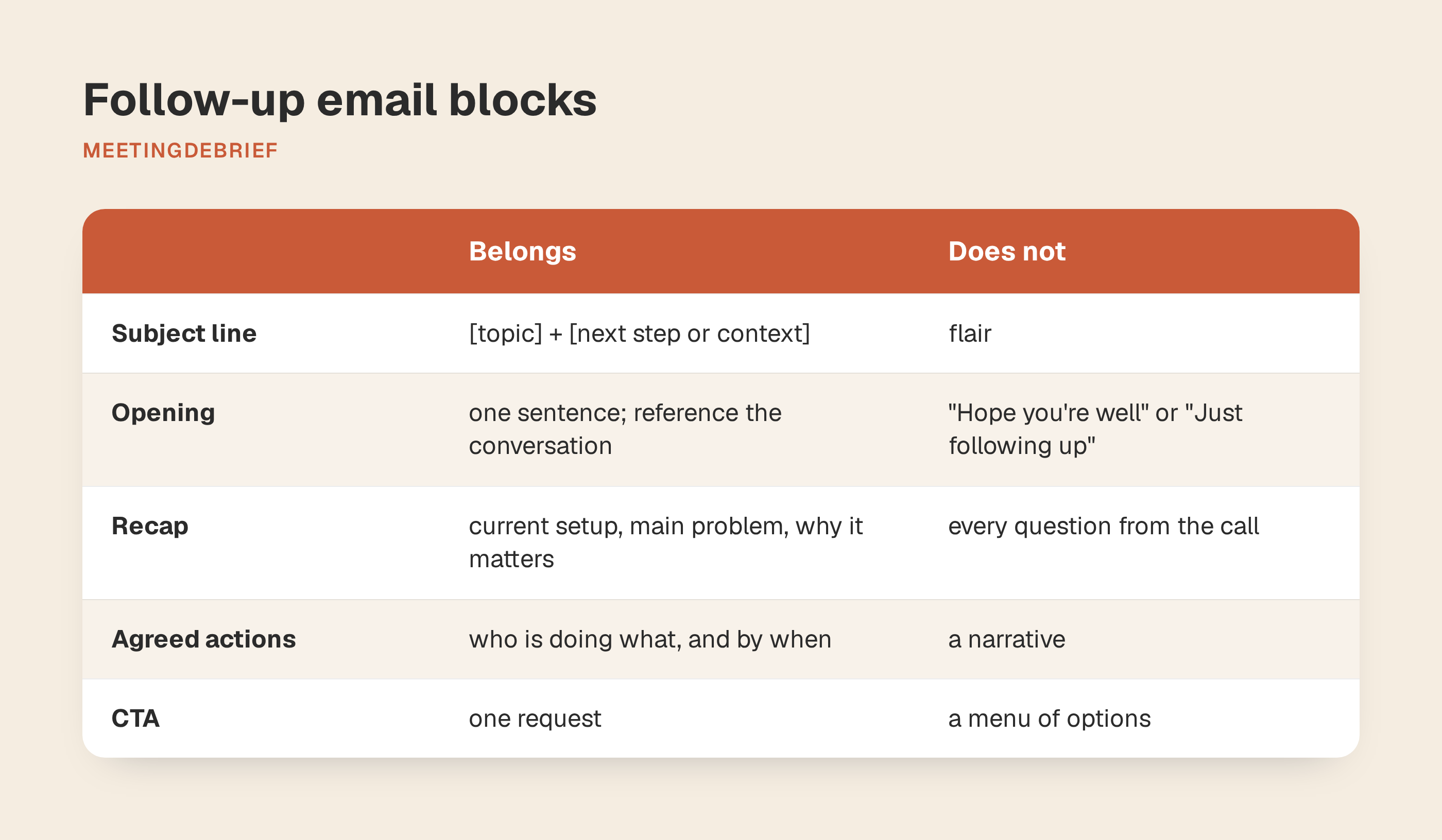
- Subject line: name the topic or next step. A simple formula is [topic] + [next step or context]. Examples:
Next steps from today's discovery callFollow-up on onboarding workflow discussionReporting requirements and proposal timing
The subject line does not need flair. It needs to help the prospect find the thread later.
-
Opening: reference the conversation naturally. Skip filler like “Hope you’re well” or “Just following up.” Use one sentence that proves this email belongs to this call:
Thanks for the conversation today. Helpful to hear how your team is handling onboarding now and where the handoff breaks down. -
Recap: restate the situation briefly. This is where specificity matters most. Keep it to the current setup, the main problem, and why it matters. For example:
From our call, the main issue is that approvals are split across email and spreadsheets, which makes it hard to see status and slows client onboarding.
If your recap starts listing every question from the call, it is too long.
- Agreed actions: write who is doing what, and by when. Plain bullets work well:
I’ll send the pricing breakdown tomorrow.You’ll confirm whether procurement needs to join the next call by [Friday, 18 October].We’re scheduled to speak again on [Tuesday, 22 October] at [2:00 PM].
If you include a meeting time, add the time zone unless the calendar invite already settles it.
This should read like a handoff, not a narrative.
- CTA: ask for one thing.
End with one request, not a menu of options:
If that plan still works on your side, please reply with the best person to include on the next call.
What you cut matters too. Leave out long scene-setting, repeated thank-yous, and vague lines like “wanted to touch base” or “let me know your thoughts” when the call already produced a concrete next move. The email should sound personal because the details are specific, not because it is padded.
Match the email to the way the call ended
The framework stays the same, but the wording should change with the outcome of the call. A booked next meeting, an internal stakeholder handoff, and an unclear next step need different subject lines and different CTAs.
A simple decision tree works:
- Next meeting booked: confirm the meeting, restate what that meeting is for, and send any promised material.
- Internal stakeholder step: name the decision or review that needs to happen, note who is involved, and make your ask support that handoff.
- Next step unclear: summarize the most likely path discussed, then ask the prospect to confirm the timing or owner.
If the next meeting is already on the calendar, the email should sound settled. A subject line like Prep for Tuesday's demo or Items for our 22 October call fits because the relationship already has momentum. In the body, spend less space on persuasion and more on readiness: what you understood, what you are sending, and what you plan to cover next time.
If someone else needs to weigh in first, shift the center of gravity. The email is now helping your contact carry the conversation forward internally. Subject lines like Materials for your internal review or Summary for finance and operations follow-up make that clear. Keep the recap narrow and include only the point relevant to the people being brought in.
Multiple stakeholders are where follow-ups often get messy. Do not write a separate recap for each person mentioned on the call. Name only the people tied to the immediate decision, what each one needs to weigh in on, and who you expect to respond next.
If the call ended with “sometime next week,” “after we talk internally,” or “once budgeting is clearer,” keep the email tentative too. Use Confirming next step from today's call or Checking timing on the reporting discussion, not Next meeting details if nothing is booked. In the body, write the likely next move as a proposal and ask the prospect to confirm or correct it.
Rewrite a weak follow-up with the transcript open
The value of the transcript shows up quickly when you compare a generic email with one grounded in what the prospect actually said.
Example source material from the call
[12:14] Sam: We’re pulling numbers from three systems, and it costs us two or three days before every board review.[26:40] Sam: If ops is comfortable, I can bring Priya from finance into a follow-up next Wednesday.- Prospecting summary: internal ops check first; possible follow-up with Priya on Wednesday, 22 October.
Weak version
Subject: Great speaking today Hi Sam, Thanks for your time today. It was great learning more about your team and goals. It sounds like reporting is a challenge, and I think there may be ways we can help. I’ll send over some information, and we can reconnect next week with anyone else who should be involved. Let me know what works. Best, [Your name]
Transcript-grounded version
Subject: Board reporting follow-up and 22 October next step Hi Sam, Thanks again for today. You mentioned that your team is pulling numbers from three systems and losing two or three days before each board review. I’ll send the reporting workflow outline tomorrow. If ops is comfortable, you’ll bring Priya from finance into a follow-up on Wednesday, 22 October. Please reply to confirm whether that timing still works on your side. Best, [Your name]
Quote the prospect’s wording directly when the phrasing carries the problem, such as a bottleneck, consequence, or constraint you may refer back to later. Paraphrase the logistics. Dates, attendees, and next steps are usually clearer when you restate them in plain calendar language. If the summary and transcript disagree, trust the transcript and the timestamped line.
If the transcript misheard a person, product name, or acronym, fix it before you borrow the wording. In MeetingDebrief, you can edit a transcript line in place, and the correction flows into search and the Markdown mirror. After a small one-word fix, the app can also offer to remember that correction. That matters when one wrong name can make an otherwise accurate follow-up look careless.
Verify dates, owners, and asks before you hit send
The last pass is QA, not more drafting. Check that each promise belongs to the right person, each time reference is safe to repeat, and the email closes with one clear ask.
A quick check order works well:
-
Match each action to an owner. If several people came up on the call, make sure the email does not flatten them into “you’ll review internally.” Separate the reviewer, the decision-maker, and the person joining the next call. If you are unsure, use Chat with this meeting to ask a direct question such as who committed to the review or who was supposed to join next. Answers include timestamped citations, and your saved Notes are included as context.
-
Turn relative timing into calendar language. “By Friday” and “next quarter” are easy to misstate after the call. MeetingDebrief summaries and chat are told the meeting’s date, so those phrases resolve against the day of the meeting. That gives you a safer basis for writing the follow-up. If the message might be read a day or two later, a real date is usually clearer than relative timing.
-
Fix names, acronyms, and jargon. If the transcript needs a correction, edit the line before you quote it back. Those edits flow into search and the Markdown mirror, which helps when you need to reuse the meeting later.
-
Cut the extra ask. Read the last two sentences by themselves. If they contain more than one request, choose the one that actually moves the deal forward and delete the rest.
Most follow-up mistakes are not writing problems. They are verification problems. Put five minutes after the meeting on your calendar, draft the email from the call record, and compare it with what you would have sent from memory. The difference usually shows up in the small things: the phrase you keep exact, the deadline you stop guessing at, and the ask that becomes easier to answer.
If you want to try that with MeetingDebrief, download it and start the 7-day free trial. No account, no card. Record your next discovery call, generate a Prospecting summary, and draft the follow-up email from the transcript instead of from memory.