Debrief
Meetings,
debriefed.
Interactive demo
See how MeetingDebrief works in this interactive demo right in your browser. Click around to explore the transcript, key moments, and summary — just like in the real app.
Yeah, absolutely. I'll have the staging environment up by Wednesday at the latest.
Yeah, so yesterday I worked on the staging environment. Ran into a minor Docker config issue but figured it out.
Staging environment setup progressing well, expected by EOD
Quick question — should the staging env use the same database seed as production, or do we want test data?
Select a session
Choose a recording from the sidebar to view its transcript and summary.
Transcript
Summary
Your time, reclaimed
Here's what MeetingDebrief has handled for you.
Meetings over time
Used to estimate the value of your saved time.
Your meetings deserve better than forgotten notes.
Completely Private
Everything runs on your device. No cloud uploads, no third-party servers, no data collection. Your conversations stay yours.
AI-Powered Locally
State-of-the-art speech recognition and language models run directly on your machine. No internet required after setup.
One-Click Workflow
Hit record, then let MeetingDebrief handle the rest. Get a full transcript, key moments highlighted, and an actionable summary in minutes. The built-in Insights dashboard tracks exactly how much time you're saving.
See every word, find what matters.
MeetingDebrief produces time-stamped, searchable transcripts in over 50 languages with automatic language detection. Each segment is labelled by speaker, so a back-and-forth reads like a real conversation. No more rewinding recordings to find that one thing someone said.
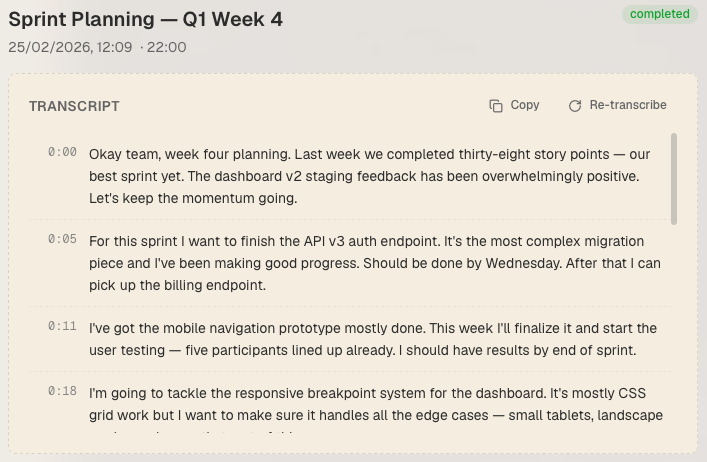
From recording to actionable summary, MeetingDebrief handles every step of your meeting workflow with on-device AI.
Record
Capture crystal-clear audio from any meeting — virtual or in-person. MeetingDebrief records system audio and microphone simultaneously, so you never miss a word from either side of the conversation.
Transcribe
Convert speech to text with state-of-the-art accuracy using Whisper, running entirely on your device. Support for multiple languages and accents, with punctuation and formatting handled automatically.
Identify Key Moments
Automatically surface decisions, action items, and critical discussion points from your conversations. Every key moment is flagged so nothing falls through the cracks.
Summarize
Get concise, actionable meeting summaries powered by local language models. Key decisions, action items, and follow-ups are extracted and organized — ready to share with your team.
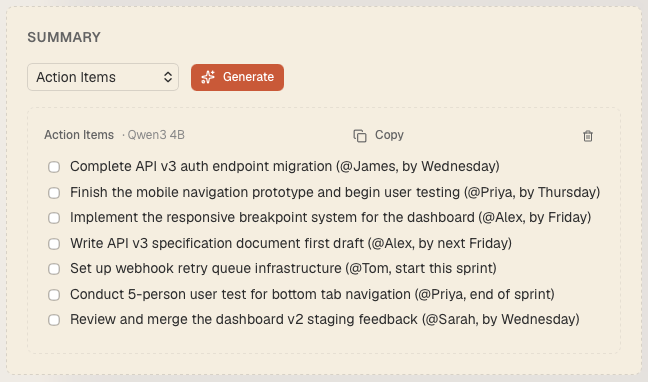
Actionable summaries, instantly.
Every meeting gets distilled into key decisions, action items, and follow-ups. Customize summary templates to match your workflow, then share with your team.
New in version 3.0
Chat with your meetings, know who said what, and enjoy cleaner audio and sharper transcripts. All on-device, all yours.
Chat with your transcript
Ask any recording a question and get a streamed answer drawn from the whole transcript. Click a cited timestamp to jump straight to the moment it came from.
Know who said what
Transcripts label each segment by speaker, separating you from the other side automatically so a back-and-forth reads like a real conversation.
Built-in MCP server
Give Claude, Claude Code, and Cursor read-only access to your meetings. Paste one config and your favorite agent can search and summarize across recordings.
Three steps to clarity.
Install & set up
Download MeetingDebrief, grant microphone access, and choose your AI models. The app downloads everything it needs — no accounts or API keys required.
Record or import
Click record before your meeting starts. MeetingDebrief captures both your microphone and system audio in the background while you focus on the conversation. Already have a recording? Drop in an MP3, WAV, M4A, or other audio file and skip straight to transcription.
Get your debrief
When you're done, MeetingDebrief transcribes the audio, highlights key moments, and generates a summary — all locally. Review, edit, and export your meeting notes.
Your meetings. Your data. Period.
MeetingDebrief is local-first by design, not as an afterthought. Every recording, every transcript, every summary lives only on your device. We don't run servers that process your data. We don't collect analytics. We don't even have the ability to access your meetings. When we say private, we mean it — architecturally, not just in a privacy policy.
No monthly fee to use your own computer.
MeetingDebrief processes everything on your hardware, with your processor and your memory. Paying a monthly subscription for software that relies entirely on your own resources never sat right with us. One purchase. Yours forever.
What people are saying.
"I used to spend 30 minutes after every meeting writing up notes. MeetingDebrief does it in seconds, and the summaries are actually better than mine."
Sarah Chen
Product Manager
"The fact that nothing leaves my machine is huge. We handle sensitive client conversations daily, and this is the only transcription tool our compliance team approved."
James Mitchell
Financial Advisor
"The way it pulls out decisions and action items is a game-changer for our standups. I get a clear list of follow-ups without rewatching the recording."
Priya Sharma
Engineering Lead